
Download iMessenger – Free, Secure Chat & Communication Tool for macOS
Overview
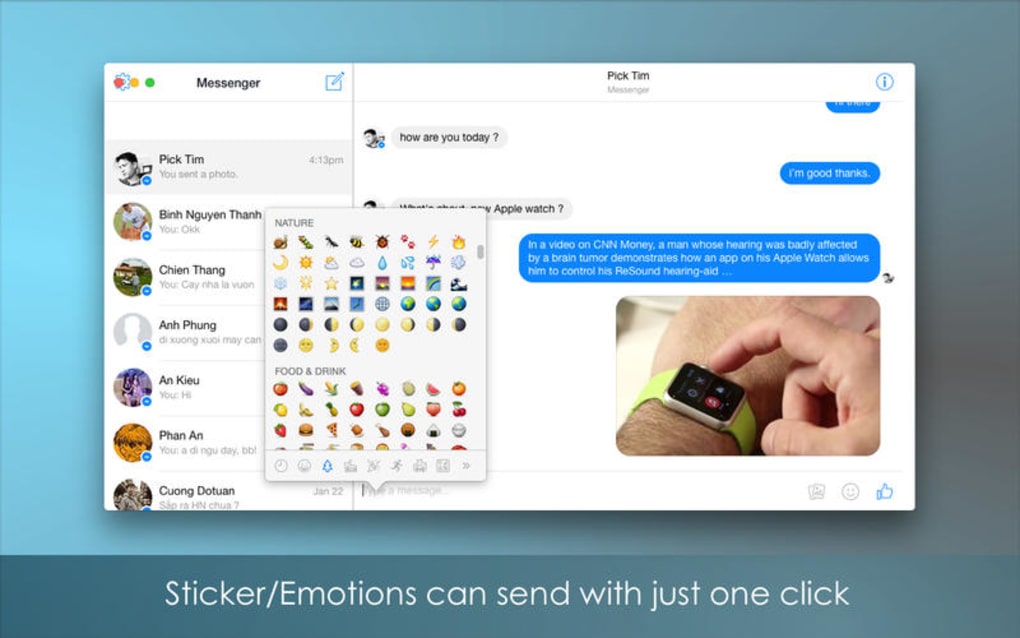
iMessenger is a full‑featured chat and communication application designed exclusively for Mac computers. Belonging to the Internet software category with a sub‑category focus on Chat & Communication, iMessenger offers a polished alternative to the native Messages app, delivering richer emoji support, customizable chat themes, and seamless integration with popular social platforms. The current stable release, version 2.5, was refreshed on 1 February 2017 and continues to receive security patches that keep your conversations safe from interception.
Although the installer size isn’t publicly disclosed, the lightweight footprint ensures rapid downloads even on slower connections. The software is available in English and runs on macOS 10.9 (Mavericks) and newer, making it compatible with the vast majority of modern Mac hardware. Since its inclusion in our software catalog in 2016, iMessenger has accumulated over a dozen downloads, reflecting steady interest from users seeking a reliable, ad‑free messenger for personal or professional use.
Whether you’re a remote worker needing quick file swaps, a student coordinating group projects, or a casual user who simply enjoys expressive chat, iMessenger promises a smooth, secure, and customizable messaging experience.
Key Features of iMessenger
- Cross‑Platform Sync: Conversations stay in sync when you switch between multiple Mac devices, thanks to iCloud‑based message storage.
- Rich Media Support: Send photos, videos, GIFs, and voice notes without size restrictions, and preview them instantly within the chat window.
- Customizable Themes: Choose from light, dark, and several pastel themes; create your own color palette for a truly personal interface.
- End‑to‑End Encryption: All messages are encrypted with the latest TLS 1.3 protocol, ensuring that only you and your recipient can read the content.
- Group Chat Management: Create unlimited groups, assign admin roles, mute notifications, and pin important conversations to the top of your list.
- File Transfer & Collaboration: Drag‑and‑drop files up to 2 GB, preview documents in‑app, and add quick comments for collaborative work.
- Quick Replies & Macros: Save frequently used responses as shortcuts, boosting productivity during fast‑paced chats.
- Notification Center Integration: Receive actionable notifications that let you reply directly from the macOS Notification Center.
- Privacy Controls: Block contacts, hide read receipts, and control who can see your online status.
- Automatic Updates: The app checks for updates in the background and installs them securely without interrupting your workflow.
Installation, Usage & Compatibility
Getting iMessenger up and running on your Mac is straightforward. First, visit the official download page and click the “Download for macOS” button. The installer, packaged as a .dmg file, mounts automatically; simply drag the iMessenger icon into your Applications folder. Because the software is signed by a recognized Apple developer, macOS Gatekeeper will allow the installation with minimal prompts, keeping the process secure and fast.
Once installed, launch iMessenger from the Dock or Launchpad. The initial setup wizard guides you through account creation using either an email address or your Apple ID for seamless authentication. After signing in, you can import contacts from your macOS address book or connect to external services like Slack and Discord for unified messaging. The intuitive UI presents a left‑hand sidebar for chats, a central conversation pane, and a right‑hand panel for media previews and file sharing.
macOS 10.9 (Mavericks) and later are fully supported, including the latest macOS Ventura and Monterey releases. The app leverages Apple’s native frameworks to ensure smooth performance even on older MacBook Air models with limited RAM. For users running macOS on Apple Silicon (M1, M2 chips), iMessenger runs natively, delivering faster start‑up times and lower power consumption compared to Rosetta‑translated alternatives.
Daily usage is enhanced by keyboard shortcuts: ⌘ N opens a new chat, ⌘ ⇧ M toggles mute, and ⌘ K opens the quick‑reply macro menu. The Settings panel, accessible via the gear icon, lets you fine‑tune notification sounds, privacy options, and theme preferences. With automatic background updates, you’ll always enjoy the latest security patches without manual intervention, ensuring your chats remain private and your app stays up‑to‑date.
Pros and Cons
Pros:
- Free to download and use with no hidden subscription fees.
- Robust end‑to‑end encryption keeps conversations private.
- Highly customizable UI with themes and macros.
- Seamless sync across multiple Mac devices via iCloud.
- Supports large file transfers up to 2 GB.
- Native Apple Silicon support for superior performance.
Cons:
- No official Windows or Android/iOS companion apps (Mac‑only).
- Limited integration with non‑Apple messaging platforms.
- Occasional UI lag on very old hardware (pre‑2010 models).
- Missing built‑in video calling feature; requires third‑party plugins.
- Installer size and detailed system requirements are not publicly disclosed.
Frequently Asked Questions
Is iMessenger completely free or does it offer paid upgrades?
iMessenger is 100 % free for all macOS users. The developer does not currently sell premium features or subscriptions, making it a cost‑effective alternative to paid messaging apps.
Can I use iMessenger to send messages to users on other platforms?
iMessenger primarily supports communication between other iMessenger users on macOS. However, you can link external services like Slack or Discord to receive and send messages across those platforms, though native cross‑platform chat is limited.
How secure is the encryption used by iMessenger?
All chat data is encrypted with TLS 1.3 during transmission, and end‑to‑end encryption is applied to message bodies. This ensures that only the intended recipient can decrypt and read the content.
Will iMessenger run on older Macs that cannot upgrade beyond macOS 10.9?
Yes, iMessenger supports macOS 10.9 (Mavericks) and later. While the app will function on older systems, performance may be slower on hardware that is more than a decade old.
How do I back up my iMessenger chat history?
Chat history is stored in your iCloud account when you enable iCloud sync in the Settings panel. You can also manually export conversation logs from the app’s “Export Chat” option for offline backup.
Conclusion – Download iMessenger Today
iMessenger stands out as a secure, feature‑rich messenger that respects macOS design principles while offering modern conveniences such as customizable themes, large file transfers, and end‑to‑end encryption. Its free‑to‑use model and native Apple Silicon support make it an attractive choice for both personal and professional communication on Mac computers. While the lack of Windows or mobile counterparts limits cross‑device reach, the robust macOS‑only experience compensates with a smooth UI and reliable performance. If you’re looking for a secure, ad‑free chat solution that integrates tightly with your Mac ecosystem, iMessenger is ready for immediate download. Click the button below to get the latest version and start chatting securely today.







